SmartGuard™ Basal Pattern Generator
Medical web tool that analyzes SmartGuard™ micro-bolus history from MiniMed™ Connect API to generate optimized basal profiles for manual mode operation
Project Gallery
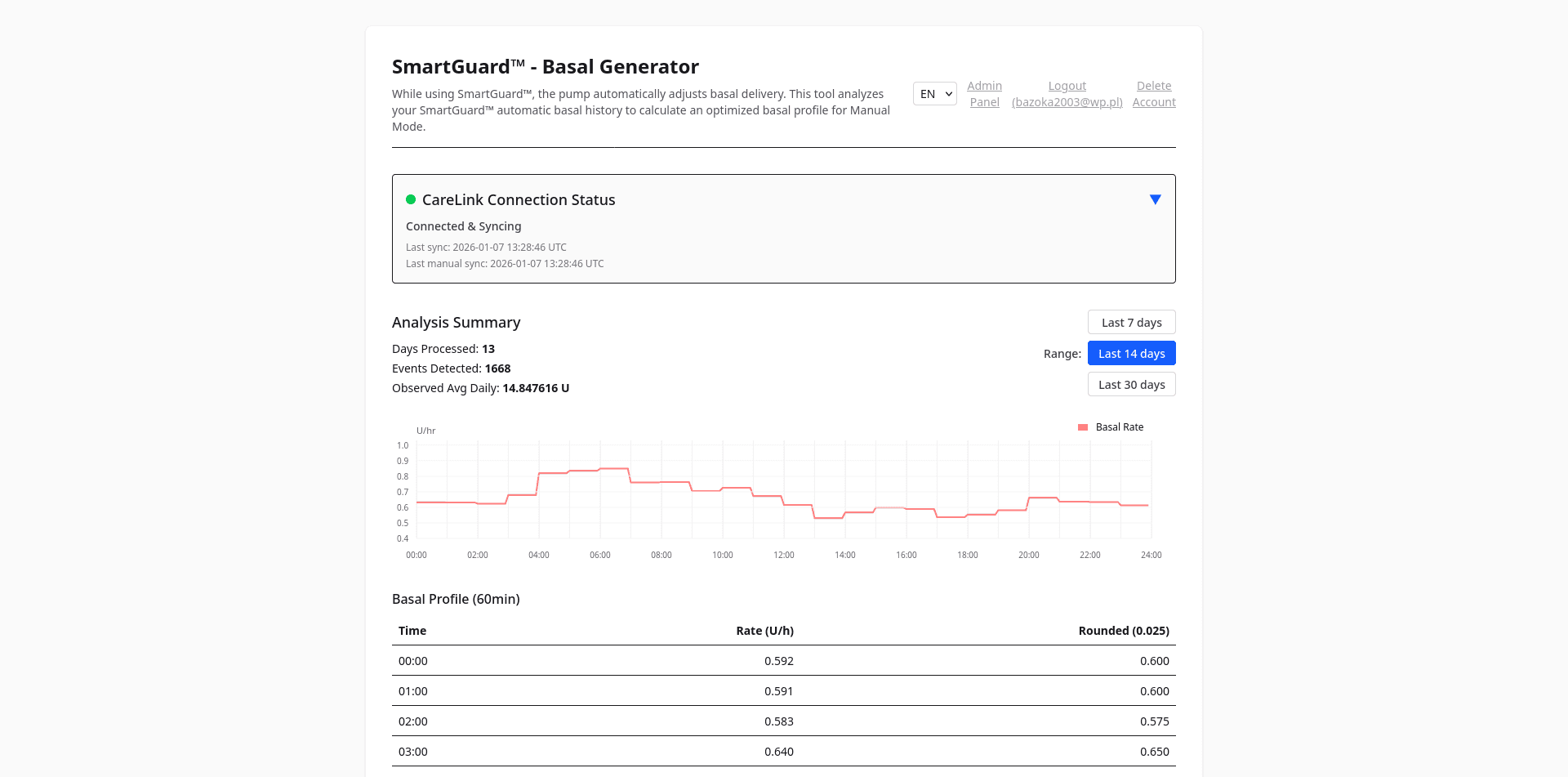
Dasboard screen
Project Overview
SmartGuard™ Basal Pattern Generator
A privacy-focused web tool that helps you recover and optimize your insulin pump's basal settings based on your real SmartGuard™ history. Designed for people using MiniMed™ 780G/Guardian™ 4 pumps who may need to temporarily switch to manual mode.
🚀 What Makes This Project Special?
This is my first widely-used, public project - and I'm incredibly proud of how much I've learned and how far it's come! Thanks to amazing feedback from users all over the world, I've been able to introduce many updates, improvements, and new features. Your suggestions and bug reports have been invaluable, and I'm extremely grateful for every message and idea you send my way.
Building this project has taught me a lot about real-world privacy, security, and the needs of people living with diabetes. It's been a journey of continuous learning, and I'm honored to support the diabetes community with a tool that truly makes a difference.
Why You Need This
When your pump is in SmartGuard™ automated mode, it constantly adjusts your basal insulin using micro-boluses. Over time, your original manual basal settings become outdated and no longer reflect your real needs.
But sometimes you must switch to manual mode, for example:
- Your CGM sensor fails or expires
- You run out of sensors
- There are calibration or system issues
In these moments, using old basal settings can cause dangerous glucose swings. This tool helps you generate a new, data-driven basal profile based on your actual recent SmartGuard™ history.
How It Works
1. Collect Your Data
- Download and run a simple tool (available for Windows, Linux, Android, and macOS)
- Log in to your CareLink™ account (your password is never stored; only a token is sent to the server)
2. Automatic & Manual Sync
- The server fetches new data from CareLink™ every few hours, as long as your token is valid
- You can trigger a manual sync if needed (rate-limited to avoid abuse)
- You only need to re-run the desktop/phone tool when your token expires. The best and highly recommended solution is to create a separate CareLink Partner account dedicated solely to this app. This keeps the access token valid for much longer
3. Analyze & Download Your Basal Profile
- Log in to the web app to see your data in chart and table,
- The tool automatically merges and deduplicates all your data - no manual uploads needed
- You get a recommended basal profile, both as precise values and as rounded for your pump
- All information is available in Polish and English; you can set your preferred language
Features & Highlights
- Interactive Charts: Visualize your hourly basal needs with beautiful, responsive SVG graphs
- Smart Data Processing: Deduplication, merging, and smoothing of micro-bolus data for accurate analysis
- Privacy by Design: Only your CareLink™ token is stored (never your password or raw health data)
- Open & Transparent: Not affiliated with Medtronic or any device manufacturer
- Community-Driven: Many improvements and features come directly from user feedback
- Cross-Platform: Desktop tool works on Windows, Linux, macOS, and Android
- Internationalization: Full support for Polish and English
Privacy & Security
- Only your CareLink™ token is stored (never your password)
- Only health data stored is basal deliveries
- All communication is encrypted (HTTPS)
- You can always remove your account and all data associated with it
Limitations & Disclaimer
- The tool is a mathematical estimation - not medical advice
- Always consult your healthcare provider before using the generated profile
- The developer is not responsible for clinical decisions
- Not affiliated with Medtronic or any medical device company
Get Started
- Download the desktop/phone tool from the website
- Run it and log in to CareLink™
- Log in to the web app to view your data and get your new basal profile
- Update your pump only after consulting your doctor
Trademark Notice: Guardian™, MiniMed™, SmartGuard™, and CareLink™ are registered trademarks of Medtronic. This project is not affiliated with or endorsed by Medtronic.